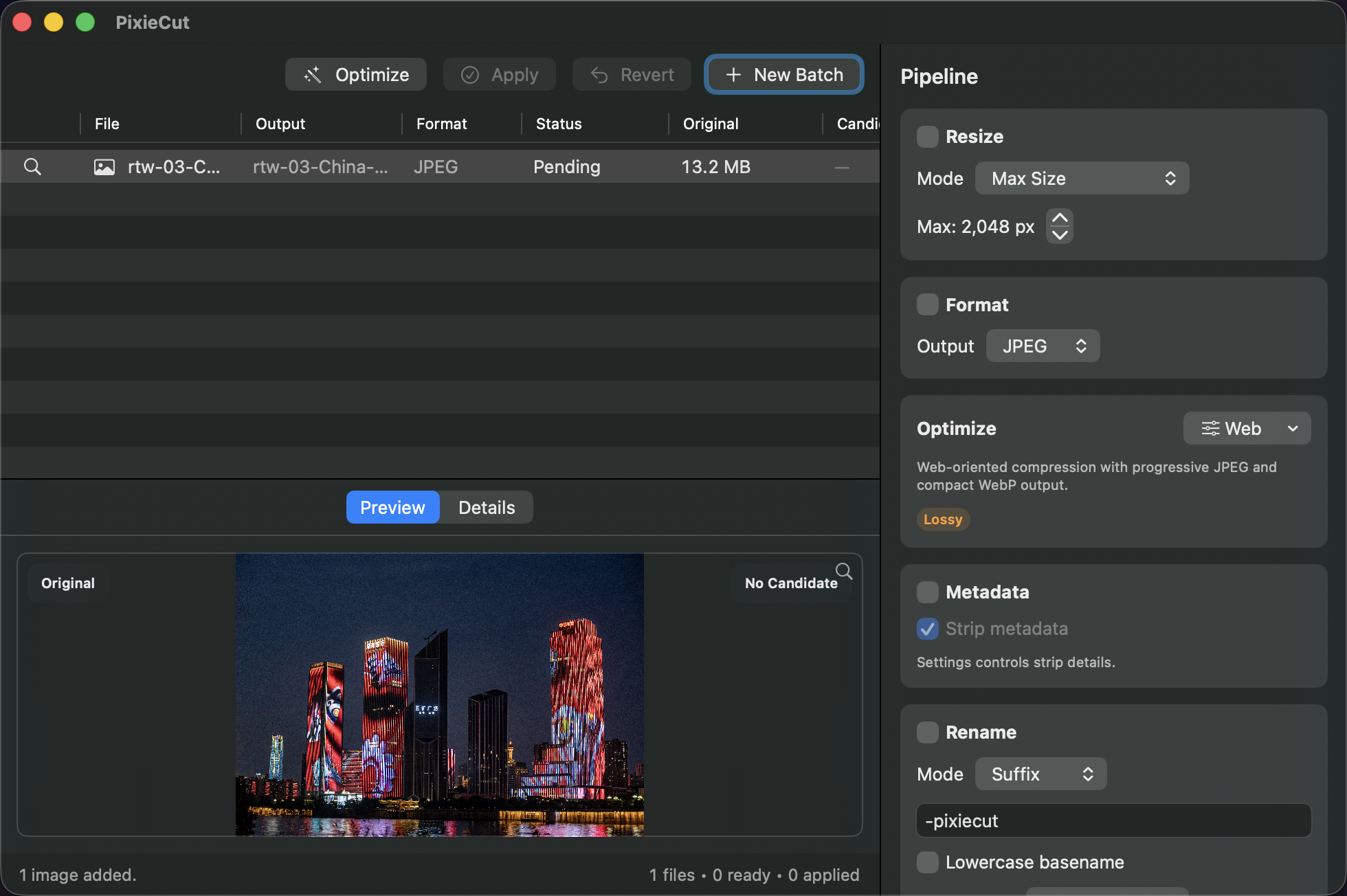
PixieCut is a native Mac app for local batch image optimization. Preview optimized
candidates before you apply, keep your files offline, and control every change with
confidence.
Leverage native Apple performance and your hardware.
Sparkle updates via Amore keep you current.
1
A safer batch workflow
Preview every change before you apply. Originals stay untouched and backed up until
you approve the result.
1
Stage a batch
Add folders or files. PixieCut scans, groups, and prepares every candidate before anything changes on disk.
1landscape_01.jpg
2portrait_04.tif
3illustration.webp
4icon-set.icns
2
Compare candidates
Review side-by-side results, output format, and savings. Nothing is applied until you approve it.
1Original 12.4 MB
2Candidate 2.9 MB
3-76% saved
3
Apply or revert
Apply optimized files you approve. Revert from backups when a batch needs another pass.
1Applied
2Applied
3Reverted
4Ready
Preview before apply is the default. You stay in control at every step.
2
Aggressive when you want it, lossless when you need it
Benchmarks in progress Numbers shown are provisional.
Lossless presets
Perfect when quality must not change. No visible loss, identical pixels when possible.
LosslessBalancedWebCustom
Up to70%smaller files provisional
Identical output when possible provisional
Visual quality checks planned benchmark suite
Tiny / Web aggressive presets
Maximum reduction for delivery. Smaller files with visually lossless results in most cases.
TinyWebBalancedCustom
Up to90%smaller files provisional
Visually lossless in most cases provisional
Visual quality checks planned benchmark suite
Built-in tools are selected automatically for every format.
3
Format-aware presets
Right tools. Right settings. Every format gets the treatment it deserves.
JPG
JPEG
Smart chroma, progressive output, and quality controls.
PNG
PNG
Lossless passes, indexed color, and alpha optimization.
TIFF
TIFF
Deflate, LZW, predictors, and bit-depth control.
WebP
WebP
Modern compression with lossy or lossless modes.
SVG
SVG / PDF
Rasterize, convert, or preserve document inputs according to source quality.
HEIC
HEIC / JPEG 2000
Convert and optimize while keeping quality preserved.
ICO
Icons (ICNS / ICO)
Right sizes and formats for every platform.
GIF
GIF
Optimize size while keeping animation caveats visible.
* GIF workflows are supported where source quality allows. PixieCut keeps unusual
input caveats visible instead of pretending every format behaves the same.
Image processing is 100% local. Your images stay on your Mac.
No uploads, no cloud compression, no remote preview generation.
Native macOS app built for speed, reliability, and offline batches.
Simple Analytics measures website visits and CTA clicks only, without tracking cookies.
Sparkle updates and app archives are hosted by Amore.
One-time PixieCut license
Pay once, use forever. No subscriptions. No accounts.
€25+ VAT where applicable
Offline batch optimization
All image processing happens on your Mac.
Preview-before-apply safety
Compare candidates side by side before you commit.
Bundled optimizer tools
High-performance helpers are included with the app.
Sparkle updates via Amore
Secure updates and downloads stay outside the website image.
Adds detailed JPG controls for each optimization tool.
JPG presets now offer advanced cjpeg tuning, exact 3- and 5-stage jpegtran output, and explicit baseline or progressive JPEGoptim output.
v1.0.0-beta.13
Aligns JPG output settings across the available JPG tools.
JPG preset editors now show one consistently named Output menu whose choices match the selected JPG tool.
v1.0.0-beta.12
Adds precise JPG output controls and improves preview reliability.
JPG presets can now choose quality from 0 to 100 and select standard or optimized baseline output, automatic progressive output, or progressive output with 3 or 5 loading stages.
Preview caches now retain the most recently decoded image, so memory pressure cannot force an immediate duplicate decode.
v1.0.0-beta.11
Tightens locked-batch imports, menu accuracy, accessibility labels, and output preview performance.
Dragging files into PixieCut while a save or optimization is running now rejects the drop immediately instead of briefly accepting it and discarding the files later.
Pasting files into PixieCut while a save or optimization is running now rejects asynchronous file providers before any file loading starts.
The View menu no longer shows sidebar or inspector toggles that do not control PixieCut's split-view workflow.
Preset range steppers now include the setting name in their VoiceOver labels, so controls such as Quality minimum and maximum are no longer announced generically.
Large pending batches now compute Output-column destination previews once per table render instead of repeating batch-wide planning work for every visible row.
Release validation now refuses malformed bundled-tool and Sparkle framework payloads before beta publishing.
v1.0.0-beta.10
Improves preview reliability, accessibility, and workflow state handling while refreshing release maintenance.
The before/after comparison divider is easier to grab, with its drag target widened to the standard 44pt accessibility minimum.
Saved export previews now open the reviewed output destination instead of any stale planned path left from earlier output-preview calculations.
Settings now opens directly to Presets so preset management is the first available settings workflow.
External optional tools like JPEGoptim, Gifsicle, icotool, and pngquant now require an explicit Settings selection instead of silently using PATH-detected installs, and PATH-only detections no longer appear selected in Settings.
Pending output previews now reuse stored image descriptors when available, avoiding extra source-file inspection while rendering destination labels.
Unavailable previews no longer expose an Open Preview VoiceOver action when there is no candidate image to inspect.
The before/after comparison slider now keeps its visible keyboard focus ring while it handles arrow-key adjustments.
Finder and Share handoff requests now stay available while the discard-candidates confirmation is pending, then clear once the new batch is accepted.
License refresh results no longer overwrite a newer registration or deactivation result if validation finishes later.
Delayed drag-and-drop or paste provider loads no longer add files to a newer batch after the user has started over.
Quitting during a save no longer deletes the active staging files while the save pipeline is still running.
Preview filmstrip thumbnails and comparison metadata now load asynchronously instead of touching image files while SwiftUI redraws.
Preview comparisons now refresh when a candidate file is rewritten at the same staged path, so repeated optimization shows the current image.
Preview badges and actual-size zoom now clear stale dimensions while rewritten images are being refreshed.
The trial titlebar badge now keeps readable text contrast in both light and dark mode.
Loading, failed, and unavailable preview placeholders now expose descriptive VoiceOver labels instead of icon-only states.
About credits still scroll seamlessly, but repeated visual copies are hidden from VoiceOver to avoid duplicate announcements.
Preview file-table cells keep explicit Voice Control labels without requiring duplicate visual copy.
The pipeline sidebar and before/after comparison internals are split into focused components, preserving the existing workflow while reducing UI coupling.
Website build dependencies and the nginx runtime image are refreshed for the PixieCut site.
v1.0.0-beta.9
Makes the default optimization preset safer, sharpens Amore licensing at launch, and polishes the main workflow layout.
Balanced is now a genuinely lossless built-in preset where PixieCut supports lossless output: JPEG uses `jpegtran`, PNG/WebP/JPEG 2000 use lossless settings, TIFF keeps LZW, and HEIC is marked unavailable instead of silently recompressing.
AmoreKit is upgraded to 0.5 so valid cached licenses and grace-period licenses are recognized synchronously at launch by the SDK.
Live workflow status now stays in a full-width header, the sidebar keeps the main Optimize/Save/Cancel action fixed at the bottom, and individual rows can be optimized or retried from the file table context menu.
Tool discovery state is cached on launch so tool availability settles without repeated probes.
The Finder workflow action is now named PixieCut.
VoiceOver can now open image previews from the file table, inspector, and selection pane, activate collapsed pipeline cards, toggle before/after zoom, and reach the preset actions menu.
Large image previews now load off the main thread, so opening a comparison no longer briefly stalls the UI.
Empty-state and About titles now scale with the system text size, and visual spacing, corner radii, and fonts are sourced from shared design tokens for a more consistent look.
The UI layer was modernized onto Swift's Observation framework and reorganized into focused files, reducing internal coupling without changing behavior.
Pipeline cards now honor the system Reduce Motion setting, fading content in and out instead of sliding when reduced motion is preferred.
Decorative icons in the drop zone, empty preview, About box, and license badge are hidden from VoiceOver so it reads only the meaningful labels.
Enabling a pipeline stage now gives subtle haptic feedback on Force Touch trackpads.
v1.0.0-beta.8
Preserves source metadata when stripping selected groups.
Fixes selective metadata stripping so unchecked groups such as GPS stay intact when optimization rewrites the image file.
Keeps preserved caption and location fields available after lossy JPEG optimization.
v1.0.0-beta.7
Speeds up resize entry and previews output filenames before optimization.
Adds fast direct entry for Resize values, with common size presets and small stepper nudges.
Keeps focused resize edits synced so optimization commands use the value shown on screen.
Adds IPTC rights fields to Watermark with helpful tooltips.
Previews output filenames before optimization.
v1.0.0-beta.6
Improves licensing feedback and hardens Amore release artifacts.
Shows the licensed Amore customer email in the registered license sheet.
Stabilizes process output draining for helper tools.
Signs PixieCut's bundled optimizer executables with hardened runtime for Amore export.
Upgrades AmoreKit to 0.4 for structured customer data.
v1.0.0-beta.5
Keeps registered licenses steady during startup validation.
Keeps registered licenses active immediately after relaunching or updating while PixieCut checks Amore in the background.
Shows a neutral Checking License badge instead of briefly showing trial status during license validation.
Propagates cached-license invalidation promptly when Amore reports a license as invalid.
v1.0.0-beta.4
Makes Watermark availability clearer.
Adds a global Watermark card toggle.
Shows an inline explanation when a watermark option is unavailable for the selected output format.
v1.0.0-beta.3
Adds pipeline-level watermarking.
Adds pipeline-level visible, IPTC, and invisible watermarking.
v1.0.0-beta.2
Settings opens cleaner, tools are easier to find.
Settings now opens on General by default.
Settings tool discovery now finds standard Homebrew and MacPorts PATH installations from GUI launches.
v1.0.0-beta.1
Refreshes the beta build for direct-distribution testing.
Refreshes the beta build for direct-distribution testing.
Includes the current Amore licensing and Sparkle beta update configuration.
Bundles signed optimizer tools plus Finder Quick Action and Share workflow extensions.